
Google Ads Guide: The Ultimate Beginner’s Playbook
Author of the guide- a marketer who learns google ads.
This Google Ads guide is written from a learner’s point of view. The author is a marketer. The author is halfway through a Google Ads course that ends with a certification. The author has not run a campaign yet. That is why the author wrote this guide. The author remembers what confused the author most, and the author can explain it in language.
If you want advice from an agency veteran with a decade of client results, this guide is not that. If you want an honest starting point on how to use Google Ads, keep reading.
What Is Google Ads and Why Does It Matter?
Google Ads is a pay-per-click advertising platform that belongs to Google. When you use Google Ads, you create ads. Pick the kind of people you want to see them. You only pay when someone clicks on your ad. Ads from Google Ads can show up on Google Search, YouTube, Gmail, and many other websites that work with Google.
For marketers, Google Ads is important because it gets in front of people just when they are looking for something. That is why Google Ads is one of the most helpful tools in digital marketing right now.
This guide about Google Ads is all about Search campaigns. Search campaigns are the place to start.
The Biggest Surprise: The Highest Bid Doesn’t Always Win
I thought the advertiser who paid the most would get the spot. That’s not how it works.
Google uses something called Ad Rank to decide ad positions. Your bid is one piece of the puzzle. Google also checks how good your ad is, how relevant it is to the search, how likely people are to click it, and how smooth the landing page experience is. According to Google Ads Help, all these quality signals have an impact on where your ad appears and how much you pay.
The takeaway is actually encouraging. With a smaller budget, a well-optimized campaign can outperform someone spending more. Quality and relevance really do matter. Sometimes a smarter ad strategy beats a budget every time.
Choosing the Right Campaign Type: Search, Display, Shopping, Video or Performance Max
Choosing the right campaign type is one of the most common lessons in any Google Ads guide, and Search, Display, Shopping, Video, and Performance Max campaigns each serve different purposes.
Search campaigns are great for text-based ads that appear when a user is actively searching for your product, whereas display campaigns are more about building awareness by reaching out to a broad audience.
Shopping campaigns utilize photos or videos to promote items on Google Shopping; video campaigns are for distributing video content via Google’s platform, and performance Max campaigns are all about utilizing Google’s multiple channels and automated processes to reach the most customers.
This Google Ads guide recommends starting with a search campaign for one simple reason: users who search a particular term are the easiest to analyze and understand. By applying the insights from this Google Ads guide, you’ll learn the ropes of managing ads and eventually branch out to other campaign types.
The Quality Factors in Plain English
| Factor | What It Means | How to Improve It |
|---|---|---|
| Expected click-through rate | How likely people are to click your ad | Write clear, specific headlines |
| Ad relevance | How closely your ad matches the search | Group tightly related keywords together |
| Landing page experience | How useful and fast your page is | Match the page to the ad’s promise |
| Bid | What you’re willing to pay per click | Start modest, then adjust with data |
Understanding Quality Score and Ad Rank in Google Ads.
Quality score is probably one of the most underrated concepts any Google Ads rookie should know. It determines how much you will pay for a click and your ad’s position on the SERP.
Google calculates the expected CTR, ad relevance, and landing page experience to determine Quality Score, then combines it with your maximum CPC to define your Ad Rank. This Google Ads guide will discuss why campaigns with optimized ads that may have a lower CPC can occupy a higher position than those with a higher budget.
To increase your score, you need to make sure your ads are relevant to the keywords and have a compelling call to action, optimize the landing page to make it relevant and user-friendly, and regularly monitor and analyze your campaign metrics. Your ads will eventually start to appear at a lower CPC and a higher position on the search engine results pages after you master the quality score concept in this Google Ads guide.
How to Use Google Ads: 7 Steps for Beginners
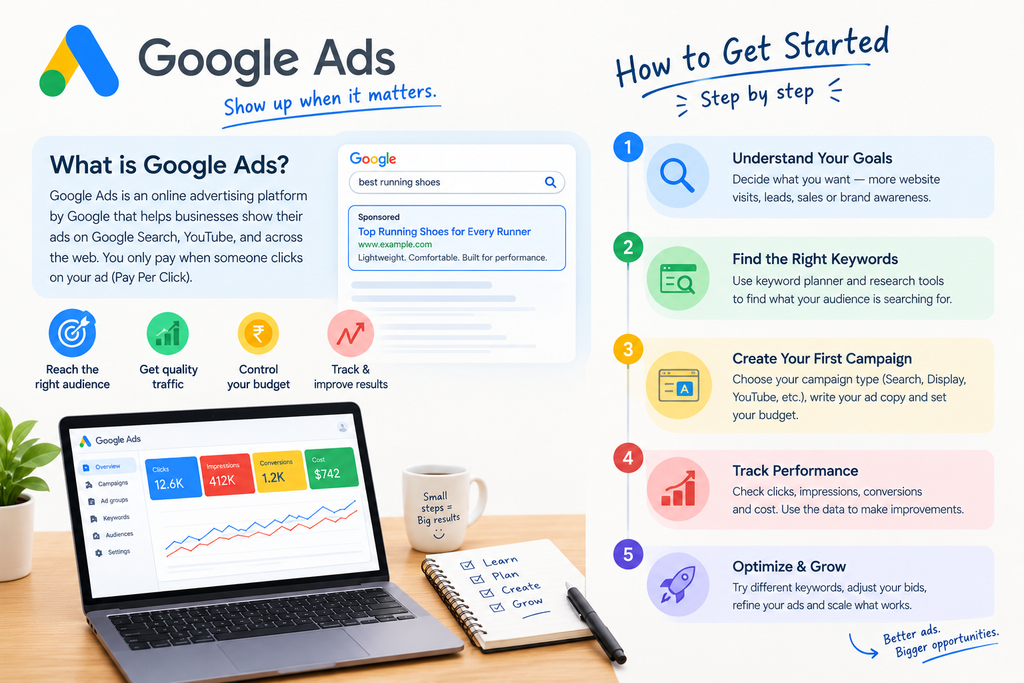
Here is the order I would follow if I were starting today. Think of it as a simple Google Ads guide you can repeat for every new campaign.
- Learn the PPC basics. Understand how auctions, clicks, and costs work before spending anything.
- Set one clear goal. Pick one: generating leads or driving website traffic. A campaign with two goals usually does neither well.
- Do keyword research. Use Google Keyword Planner to find what people actually search for.
- Start with a simple Search campaign. Skip the advanced formats until you understand the basics.
- Set a small budget. Treat your first campaign as a learning exercise, not a bet.
- Write relevant ads. Every ad should match the keywords it targets.
- Set up conversion tracking before launch. Without it, you can’t tell which clicks led to results.
That last step is easy to forget. If tracking isn’t configured properly, you’ll be guessing instead of optimizing.
Understanding Search Intent in Keyword Research
Keyword research is more than finding popular terms. You need to understand why someone is searching.
A person searching “what is PPC” wants to learn. A person searching “hire a PPC agency” wants to buy. Ads work best when they target people closer to taking action.
When you review keywords, ask yourself:
- Is this person researching, comparing, or ready to act?
- Does my landing page answer what they need?
- Would I click this ad if I searched this phrase?
The Mistake I Want to Avoid: Broad Keywords Without Negatives
One of the common beginner mistakes is picking broad keywords and not using negative keywords at all. This leads to money being wasted on clicks that don’t turn into sales.
Here’s a simple example. Imagine you sell paid courses. Someone searches for “free marketing course.” That person might click your ad. They’re not going to pay for anything. If you add “free” as a keyword, your ad won’t show up for that search. That saves you money. Keeps your budget focused.
Every Google Ads guide warns beginners about this mistake, and for good reason: using broad keywords without negative keywords brings irrelevant clicks and wastes budget. If someone searches “free Google Ads course” and your ad is for paid services, you pay for a click that will never convert.
A solid Google Ads guide teaches you to avoid this by researching keywords carefully, understanding search intent, adding negative keywords like “free”, “jobs” and “salary”, and checking your search terms report regularly. That is why I treat this Google Ads guide as a habit-building tool: start with focused keywords, block the wrong traffic early, and optimise from real data instead of guesswork.
My plan to avoid this mistake is straightforward:
First, do keyword research before you even start running ads.
Then make sure you understand what each keyword means—what the searcher really wants.
Add keywords right from the beginning. Don’t wait.
Finally, check the search terms report often. Look for terms that aren’t relevant and add them as negatives.
This keeps your campaigns clean and effective. It’s a step, but it makes a big difference.
Setting Up Conversion Tracking Before You Launch Your Campaign
Conversion tracking is the step every Google Ads guide tells you not to skip, because without it you cannot tell which clicks bring real results. Conversions are the actions you care about, such as form submissions, phone calls, purchases, or WhatsApp enquiries.
This Google Ads guide recommends setting up tracking with the Google Ads conversion tag or Google Tag Manager before spending a single rupee, then testing that it fires correctly.
Once data starts coming in, you can see which keywords, ads and audiences drive leads and which ones only drain your budget. Follow this part of the Google Ads guide, and every optimisation decision you make will be based on evidence instead of guesswork.
Google Ads Campaign Optimization: Balance Budget, Targeting, and Conversions
My problem with Google Ads campaign optimization comes from the fact that you have to balance three things: budget, targeting, and conversion.
If your budget is low, then you get very little data. If you target wide, then you get clicks that don’t convert. If you target narrow, then you lose opportunities.
The most basic optimization process would look like this:
Evaluate your performance regularly. Review your performance weekly, not hourly. Evaluate your performance in terms of conversions, not clicks. Clicks cost money. Conversions provide value. Modify one element at a time. In this way, you’ll know what caused the changes. Follow the data. Don’t modify anything if you do not have the data yet.
Patience is really important here. A Google Ads campaign requires data before numbers can be trusted.
Common Beginner Mistakes at a Glance
| Mistake | Why It Hurts | Better Approach |
|---|---|---|
| Broad keywords, no negatives | Wasted spend on irrelevant clicks | Add negative keywords early |
| No conversion tracking | You can’t measure success | Configure tracking before launch |
| Changing many settings at once | You can’t tell what worked | Make one change at a time |
| Ignoring the landing page | Good clicks fail to convert | Match the page to the ad |
Benefits of Google Ads for Small Businesses and Marketers
Another reason to study the Google Ads guide is the ability to understand the value that such a platform may generate for any company, regardless of its size. Google Ads will introduce your brand to potential clients right during their search for something that you have to offer, thus generating traffic that is more likely to make a purchase than any other channel.
You will have total control over how much money to spend, what places for advertising to use, and when. The Google Ads guide reveals that large budgets are not required to launch a campaign: a small budget, smartly chosen keywords, and tracking will be sufficient to see what is working and what is not.
Use the Google Ads guide as your guide. You will be able to grow only if the data says so.
Limitations of This Google Ads Guide
I need to make it clear that I have never done any kind of marketing campaign in google ads; therefore, I am unable to talk about my performance data or client performance data. This is based entirely on my understanding from my course and official documentation.
The results will differ in each industry and according to competition, budget, and location. Take this as a guideline to start with.
Why This Google Ads Guide?
This Google Ads guide is written for beginners who want clear, practical steps instead of confusing jargon. Many people jump into Google Ads, set a budget and hope for the best, then wonder why their money disappears on irrelevant clicks.
This Google Ads guide covers the fundamentals in a logical order: understanding PPC basics, setting a clear goal, researching keywords, building a simple Search campaign, setting up conversion tracking, and optimising from real data. It also highlights the common mistakes learners run into, so you can avoid them early.
If you want a Google Ads guide that explains what to do and why it matters, this one will help you start with confidence.
Frequently Asked Questions
Is Google Ads good for beginners?
Yes, if you start small. A simple Search campaign with a modest budget let’s you learn without much risk.
How much budget do I need to start?
There is no single right number. Start with an amount you’re comfortable spending while you learn, then adjust as you gather data.
Does the highest bid always get the top position?
No. Google also considers ad quality, relevance, expected click-through rate, and landing page experience.
What are negative keywords?
They are terms you add so your ads don’t show for certain searches, such as “free” for a paid product.
Why is conversion tracking important?
It shows which clicks lead to real actions, like form submissions or purchases. Without it, optimization becomes guesswork.
Conclusion: Your Google Ads Guide Action Plan
Google Ads favors quality, not budgets. Learn the basics. Define a single goal. Select keywords based on their intentions. Secure your budget by selecting proper keywords. Set up conversion tracking. Refine using data.
Your actions to follow:
- Define a single goal for your first campaign
- Select a list of keywords using the Keyword Planner tool
- Run a small Search campaign with tracking set up
- Analyze your results weekly and make changes one at a time
Refer to this Google Ads guide as your initial checklist and adapt your Google Ads strategy through hands-on experience. Whether you’re a business owner running your own ads or a freelance digital marketer managing campaigns for clients, these fundamentals stay the same: start small, track everything, and let the data guide your next move.
Pingback: 7 Digital Marketing Myths I believed as a beginner.